
Nehanda CLI
An agentic terminal REPL and single-process engine for energy systems research and software development. Normalizes multi-OEM energy telemetry through the ODSE protocol, enforces a governed SDLC workflow, and stores every turn, tool call, and phase transition in a local SQLite database you own.
Architecture
Nehanda CLI is a layered system with six distinct layers. Every component shown below is documented in the pages listed under Nehanda CLI in the sidebar.
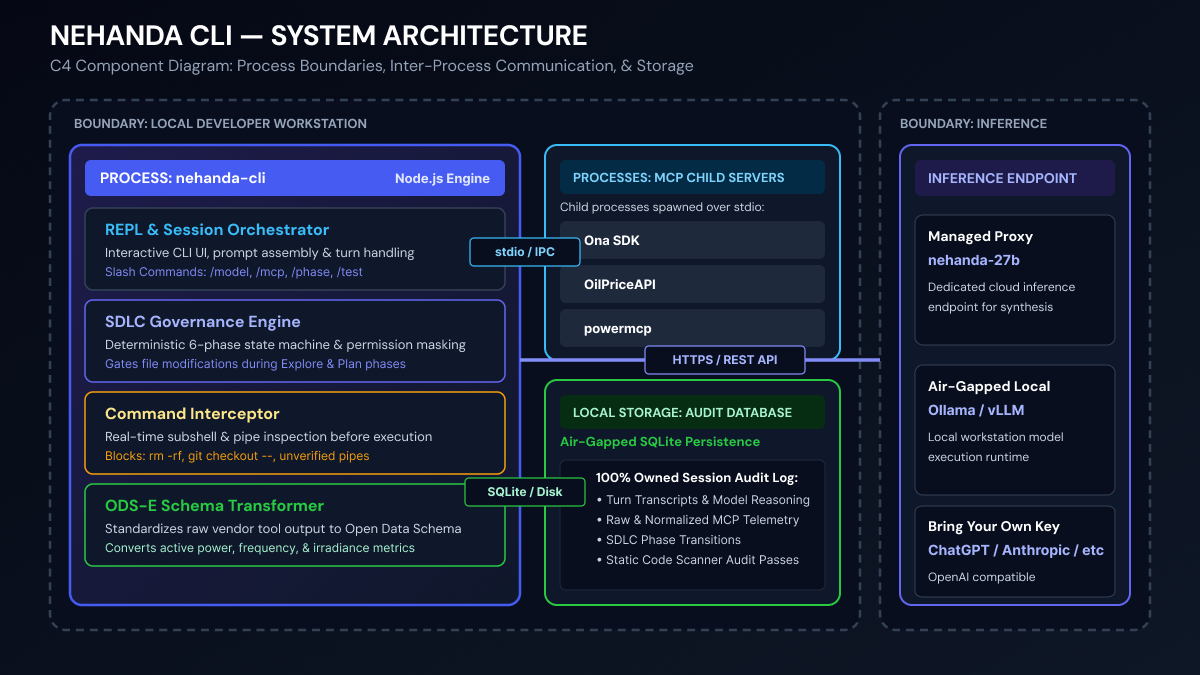
| Layer | What it does | Documented in |
|---|---|---|
| REPL / Ink TUI | Command parsing, permission gates, display rendering, interactive safety interventions | REPL Reference, Permissions |
| Engine Core | Turn loop (runUserTurn), SDLC state machine, Jev-Mem memory architecture, tool orchestration, [TOOL_CALL] rescue path |
Engine & Turn Loop, SDLC Workflow, Tool Calling |
| Tool Layer | 21 built-in tools, 4 safety checkers, MCP client for external tools | Built-in Tools, MCP Integration |
| ODSE Middleware | OEM brand detection, energy payload normalization, SCADA table rendering | MCP Integration → Energy Middleware |
| Provider Layer | OpenAI-compatible client abstraction, multi-provider switching | Providers |
| Persistence Layer | Local SQLite database (schema v3: 14 tables + Jev-Mem graph + pinned context, WAL mode, FTS5) | Database |
Cross-cutting concerns are documented separately:
- Configuration — Settings files, merge strategy,
/configcommands - Hooks — Event-driven hook system for file changes, tool use, and phase transitions
- Pipe Mode — Headless execution,
--eval,--transition, and automation
Key Features
In-Process Engine
Executes turns directly inside the process via runUserTurn, eliminating separate server daemons or background HTTP relays. The engine runs a deterministic loop: prompt → API call → tool execution → response, all within a single Node.js process.
ODSE Energy Normalization
lib/energy-middleware.mjs intercepts MCP tool results from energy data servers and automatically normalizes them to the ODS-E schema before the model sees the payload. OEM brand is resolved from the MCP server name (e.g. energy-huawei → huawei) or inferred by field-signature fingerprinting across 20+ OEM schemas. Multi-channel SCADA arrays and inverter state records render as box-drawing terminal tables with column headers and row-count summaries rather than raw JSON dumps.
Supported OEMs: Huawei FusionSolar, Enphase Envoy, SolarEdge, Fronius, Solarman, SMA, Solis, Sungrow / iSolarCloud, Sungrow BESS / PowerTitan, BYD BESS, Fimer / AuroraVision, SolaxCloud, Eskom (portal, AMR, NRS049), Vestas, Siemens Gamesa, Nordex, Terraco, and generic CSV.
See MCP Integration → Energy Middleware for setup and naming conventions.
Jev-Mem Memory Architecture
Every turn, a System-1 control plane (Laya — 421M parameters, Apache 2.0) classifies observations into a multi-relational memory graph (semantic / temporal / causal / entity edges), then adaptively retrieves evidence before each model call. System-2 receives a compact canonical header + retrieved evidence + last 2 turns — cutting prefill 70–85% on long sessions.
Domain invariants critical to energy research — ODSE schema mappings, asset capacity limits, simulation bounds — are stored in the pinned_context table and reattached verbatim before every System-2 prompt. This prevents model drift and hallucinated parameters across arbitrarily long SCADA ingestion and grid simulation sessions.
Deterministic SDLC Workflow
Enforces a 6-phase state machine (idle → explore → planning → implement → test → verify → done) to prevent unapproved code changes, hallucinated test passes, or unverified implementations. Each phase has its own system prompt, tool mask, and human gate.
Interactive Safety Interventions
When execution checkers flag a command — opening local sockets, inspecting HIL testbed hardware paths, writing outside the working directory — the engine raises a structured { status, reason, risk_score, proposed_remediation } payload. In the TUI, blocked operations surface a BlockConfirmMenu ([A] Approve for Session | [S] Run in Laya Sandbox | [C] Cancel) wired directly into the Ink event loop. Session approvals are cached so the same operation is not re-prompted within a session. Headless pipe mode auto-denies without prompting.
Runtime Visibility
RuntimeHealthMonitor probes active inference endpoints (1s HEAD request) and checks Laya sidecar liveness before each session. The TUI status header shows active model, endpoint health and latency, sidecar PID, and context usage percentage — giving researchers immediate visual confirmation of whether the target backend is an internal local host or an external cloud endpoint before uploading grid telemetry.
Permission Gate
Every tool call passes through the permission gate before execution. Five permission modes (default, bypassPermissions, dontAsk, acceptEdits, plan) control whether tools are auto-allowed, auto-denied, or require human confirmation. Permissions are phase-aware: implement and test phases auto-allow execution tools since the plan was already approved.
21 Built-in Tools
File operations (Read, Write, Edit), shell execution (Bash), discovery (Glob, Grep), web access (WebFetch, WebSearch), notebook editing, git worktrees, subagent spawning, MCP integration, and more. Tools are filtered by SDLC phase — mutating tools are masked during explore and planning.
Multi-Provider Switching
Seamlessly switch between Nehanda 27B, local LM Studio, Ollama instances, Anthropic Claude, or any OpenAI-compatible API using /model. The provider layer auto-detects capabilities (e.g., Ollama tool support) and falls back to manual tool injection when needed.
Dynamic Tool Rescue ([TOOL_CALL])
For endpoints that strip OpenAI tool schemas (like the Nehanda vLLM proxy), the engine injects tool schemas into system prompts using [TOOL_CALL] delimiters, parses them from model output, and executes them locally — bypassing vLLM’s --tool-call-parser stop-token interception entirely.
Complete Audit Trail
Every conversation turn, tool call, phase transition, permission decision, and hook invocation is stored in a local SQLite database at ~/.config/nehanda/ona-session.db. You own this data — no cloud dependency for persistence.
Quick Start
git clone https://github.com/AsobaCloud/nehanda-cli.git
cd nehanda-cli
npm install
npm start
See the Getting Started page for the full setup guide including provider configuration.
License
AGPL-3.0. See NOTICE for third-party attributions.