
Architecture
Nehanda CLI is a layered system with five distinct layers, each with a single responsibility. The architecture diagram below shows every component and its connections.
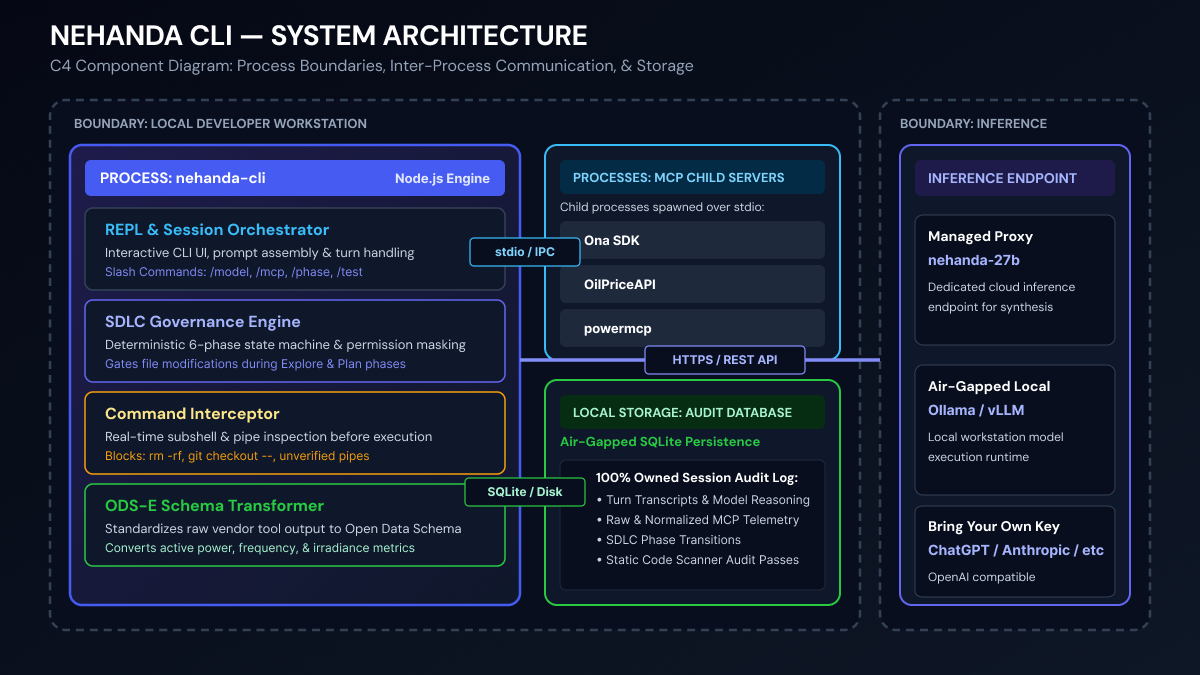
Layer Overview
Layer 1: REPL / Ink TUI
The outermost layer is the user interface, built with Ink (React for the terminal).
Command Parser — Interprets all / commands (/help, /model, /config, /mcp, /clear, /retry, /exit). Slash commands that modify state (like /model or /config) write directly to the settings database. See REPL Reference for the complete command listing.
Permission Gate + BlockConfirmMenu — Every tool call the model produces is evaluated against the permission policy before execution. The gate can auto-allow, auto-deny, or prompt the user. When a command is structurally blocked (opening local sockets, inspecting HIL hardware paths, writing outside the working directory), the engine surfaces a BlockConfirmMenu in the Ink event loop — [A] Approve for Session | [S] Run in Laya Sandbox | [C] Cancel — rather than crashing or silently dropping the call. Session approvals are cached so the same command is not re-prompted within a session. Headless pipe mode auto-denies without prompting. See Permissions for the full policy model.
Display Renderer — Ink React components render the assistant’s streaming text, tool call indicators, spinners, approval prompts, and SCADA table output. JSON array payloads from energy tool results are automatically rendered as box-drawing tables with column headers and row-count summaries. In pipe mode (stdin not a TTY), the renderer is replaced with plain stdout/stderr for automation.
Layer 2: Engine Core
The engine is the brain of the system. It runs entirely in-process — no separate server daemon or background HTTP relay.
Turn Loop (runUserTurn) — The main entry point for every user interaction. On each turn:
- The user’s prompt is submitted to the hook system (
UserPromptSubmit) - The prompt is appended to the transcript
- The Jev-Mem hot path runs: ingest observation → extract canonical System-1 state (Laya) → retrieve evidence → build compact System-2 message list (pinned context + canonical header + evidence + last 2 turns)
- The model is resolved (provider + model ID)
- The appropriate provider path is selected (Anthropic SDK or OpenAI-compatible)
- A loop runs: send messages → receive response → execute tools → repeat until the model stops calling tools
See Engine & Turn Loop for the full execution flow.
SDLC State Machine — Enforces a deterministic phase progression. The model cannot jump phases or skip gates. Phase transitions are validated against an allowlist of valid transitions and persisted to the database. See SDLC Workflow for the complete state machine.
Tool Orchestrator — Selects which tools are available to the model based on the current phase:
explore: onlyRead,Glob,Grep(plusexplore_onlydynamic tools)planning: no tools at all — the model writes its plan as textimplement/test/idle: all tools
When a tool is called, the orchestrator runs pre-tool hooks, evaluates permissions (including the interactive safety interceptor for blocked commands), executes the tool, runs post-tool hooks, and appends the result to the transcript. See Built-in Tools for the full tool inventory.
[TOOL_CALL] Rescue Path — For providers that can’t handle native tool schemas (like the Nehanda vLLM deployment behind a proxy that strips tools arrays), the engine injects tool definitions into the system prompt using [TOOL_CALL]...[/TOOL_CALL] delimiters. The model emits tool calls as structured JSON within these delimiters in its text output, which the engine then parses and executes locally. See Tool Calling for the full explanation.
Layer 3: Tool Layer
All tools the model can invoke live in this layer.
Built-in Tools (21) — Core software engineering tools: Read, Write, Edit, Bash, Glob, Grep, NotebookEdit, WebFetch, WebSearch, AskUserQuestion, Brief, TodoWrite, TaskOutput, TaskStop, Agent, Skill, ToolSearch, EnterWorktree, ExitWorktree, ListMcpResources, ReadMcpResource. See Built-in Tools for the complete reference.
Safety Checkers (4) — Declarative tools registered from JSON configs in lib/tools/: AuditCodeIntegrity, ShellSafetyChecker, JsSafetyChecker, PythonSafetyChecker. They are mandatory in the test phase — the model cannot declare tests passing until all four pass. When a checker detects a violation, it emits a structured { status, reason, risk_score, proposed_remediation } JSON payload to stderr so the TUI can surface the interactive BlockConfirmMenu identically to a bashguard block. New checkers can be added with zero JavaScript changes. See Built-in Tools → Safety Checkers for details.
MCP Client — Connects to external MCP servers configured in mcp.json. Discovered tools are namespaced as mcp__<server>__<tool> and injected into the model’s tool list. Results from servers with recognized OEM names pass through the ODSE middleware automatically. Results are cached for 60 seconds per server. See MCP Integration for the full setup guide.
Layer 4: ODSE Middleware
Sits between MCP tool results and the model, normalizing energy-specific payloads to the ODS-E schema before the model sees them.
OEM Detection — Brand resolution happens in two passes. First, the MCP server name is parsed for a known OEM key (energy-huawei → huawei, mcp-solaredge → solaredge). If that fails, field signatures in the payload are matched against known schemas — { inverter_state, run_state } → Huawei FusionSolar; { end_at, wh_del, devices_reporting } → Enphase Envoy; { data: { telemetries } } → SolarEdge; and so on across 20+ OEM schemas. If neither pass resolves an OEM, the payload passes through unchanged.
Transformation — Resolved payloads are piped through lib/scripts/odse-transform.py, which calls the odse Python package to normalize to ODS-E. Output format is controlled by --format table|ndjson|summary; defaults to table when stdout is a TTY and ndjson when piped.
See MCP Integration → Energy Middleware for the complete setup guide, naming convention, and supported OEM list.
Layer 5: Provider Layer
Abstracts away the differences between LLM providers behind a unified interface.
OpenAI-Compatible Client — Used by Nehanda Cloud, LM Studio, Ollama, Zhipu, and any OpenAI-compatible endpoint. Supports streaming, tool calling (native and rescue path), and automatic fallback when a provider doesn’t support tools.
Anthropic SDK — Used by Claude models via the official @anthropic-ai/sdk. Supports streaming, native tool use, and OAuth bearer tokens.
Provider Config — Each provider has a base_url, model identifier, and optional api_key. The active provider is stored in settings and can be switched at runtime with /model. See Providers for the full provider reference.
Layer 6: Persistence Layer
All state is stored locally in a single SQLite database — no cloud dependency for persistence.
Database location: ~/.config/nehanda/ona-session.db (configurable via AGENT_SDLC_DB environment variable).
Key characteristics:
- WAL (Write-Ahead Logging) journal mode for concurrent reads
- Schema v3: 14+ tables covering conversations, sessions, transcripts, plans, events, hooks, permissions, and the full Jev-Mem memory graph
- FTS5 full-text search index on the
memoriestable memories+memory_edges— the Jev-Mem multi-relational graph (semantic / temporal / causal / entity edges)laya_jev_state— System-1 canonical session control block (task_status, file_target, escalation_risk)pinned_context— Session-scoped domain invariants (ODSE schema mappings, asset specs, simulation bounds) that survive compaction unchanged- All data queryable with any SQLite client
See Database for the complete schema reference.
Cross-Cutting Concerns
| Concern | Description | See |
|---|---|---|
| Configuration | Settings files (.ona/settings.json), database-backed merge, /config commands |
Configuration |
| Hooks | Event-driven shell commands on tool use, file changes, phase transitions | Hooks |
| Pipe Mode | Headless execution, --eval, --transition, automation |
Pipe Mode |
| Bash Guard | Pre-execution validation returning structured { status, reason, risk_score, proposed_remediation } payload; interactive BlockConfirmMenu in TUI; auto-deny in pipe mode |
Built-in Tools → Bash |
| ODSE Normalization | Automatic interception and normalization of energy MCP payloads to ODS-E schema | MCP Integration → Energy Middleware |
| Epistemic Filter | Redacts SEARCH/REPLACE blocks from assistant context during test phase |
SDLC Workflow → Epistemic Isolation |